Introduction: Order Transparency Is at the Core of Customer Experience
In the 3D printing service industry, lack of transparency in order progress is one of the main reasons for customer complaints. Survey data shows that 35% of customer inquiry calls are related to order status checks. This not only increases customer service costs, but also affects customer satisfaction and trust.
1. Pain Points of Traditional Order Management
1.1 Low Efficiency in Status Inquiries
Under the traditional model, customers need to ask about order progress by phone, email, or WeChat, with an average response time of 4-8 hours. This passive communication model seriously affects the customer experience, especially for urgent projects, where customer anxiety is even stronger.
1.2 Incomplete Information Delivery
Verbal or written replies often can only provide vague progress information, such as "printing in progress" or "almost finished," and customers cannot obtain key information such as the specific estimated completion time or details of the current process.
1.3 Delayed Handling of Exceptions
When an order is delayed or has quality issues, customers are often not informed until the delivery deadline is approaching. The lack of an early warning mechanism means customers cannot adjust project plans in time.
2. Core Functions of an Online Order Tracking System
2.1 Order Status Management
Establish a standardized order status system to achieve full-process visibility:
| Status Stage | Status Description | Estimated Duration |
|---|---|---|
| Pending Review | Model file pending technical evaluation | 2-4 hours |
| Pending Quote | Cost calculation in progress | 4-8 hours |
| Pending Confirmation | Waiting for customer to confirm the quote | Customer decides |
| Pending Scheduling | Confirmed, awaiting production scheduling | 1-2 days |
| Printing | 3D printing and manufacturing in progress | Based on project |
| Post-processing | Support removal, surface finishing, etc. | 0.5-2 days |
| Quality Inspection | Quality testing and dimensional measurement | 2-4 hours |
| Pending Shipment | Packed and awaiting logistics | Within 1 day |
| Shipped | Handed over to logistics for transport | Based on distance |
| Completed | Customer confirmed receipt | - |
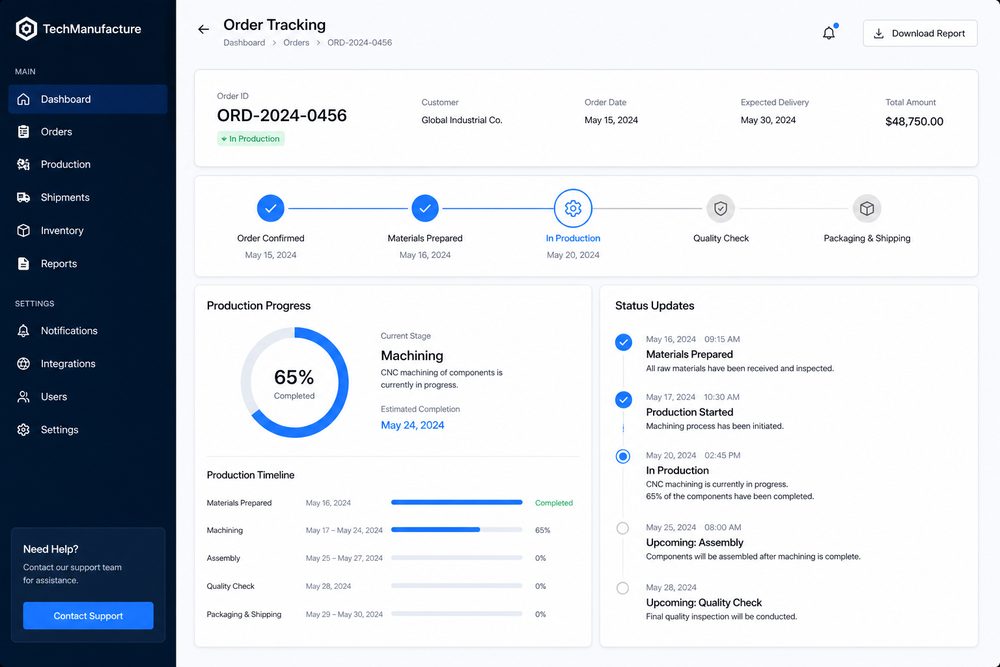
2.2 Visual Progress Display
Display order progress intuitively through a graphical interface:
- Timeline view: Show each stage of the order and the current status in a timeline format
- Estimated completion time: Predict the duration of each stage and the final delivery time based on historical data
- Real-time updates: The system automatically updates the status without manual intervention
- Images/videos: Provide photos or short videos from the production site at key milestones
2.3 Exception Warning Mechanism
Establish an intelligent warning system to identify potential issues in advance:
- Delay warning: Automatically flagged when actual progress falls behind the planned schedule
- Quality exception: Notify the customer immediately and provide a solution when quality inspection fails
- Material shortage: Notify in advance when material inventory is insufficient and provide alternative options
- Equipment failure: Promptly inform the customer of the estimated recovery time when equipment downtime affects the order
2.4 Customer Notification Delivery
Establish a multi-channel notification delivery system:
- WeChat/SMS notifications: Automatically push progress updates at key milestones
- Email notifications: Send detailed emails for important changes (quote confirmation, shipment)
- In-system messages: Centralize all notifications in the system message center
- Personalized settings: Customers can customize notification frequency and channels
3. Key Steps for System Implementation
3.1 Data Collection System Development
The accuracy of order tracking depends on real-time data collection:
- Networked production equipment: Enable real-time uploading of equipment status and printing progress
- Process scan confirmation: Update the status by scanning codes after each process is completed
- Quality inspection data entry: Enter quality inspection results into the system in real time
- Next Step Is this close to what you need?
Submit a model, drawing, image or written notes. Engineers will review material, process, finishing and delivery based on actual use.